Display shipping costs in quotes
Moderate Upgrade
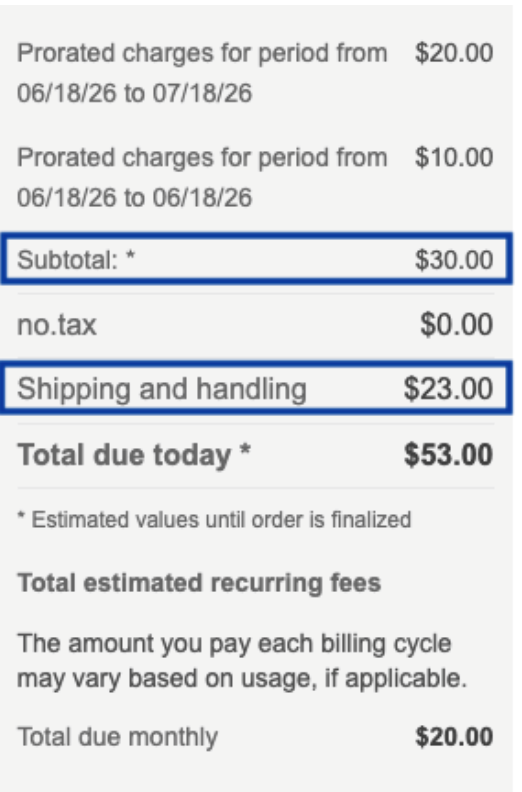
Quotes now display shipping costs for physical products as a distinct line item instead of summing them into the sub-total. Shipping appears in the Quote summary alongside taxes and other fees, so marketplace buyers, resellers, and administrators can see how the final total is constructed when reviewing or sharing a quote.
Previously, shipping was included in the quote sub-total without a separate line item. This made it harder to identify shipping fees and reconcile quote totals.
📝 Note: Shipping must be enabled and configured in the marketplace for shipping charges to appear on quotes. For more information, see Configure shipping.
What's new
- Separate line for shipping costs — Shipping and handling appears as its own entry in the Quote summary.
- Grouped with other charges — Shipping is shown with other non-item charges such as taxes and fees, not mixed into the Items sub-total.
- Clear total breakdown — The quote total reflects the Items sub-total plus shipping, taxes, and other non-item charges.
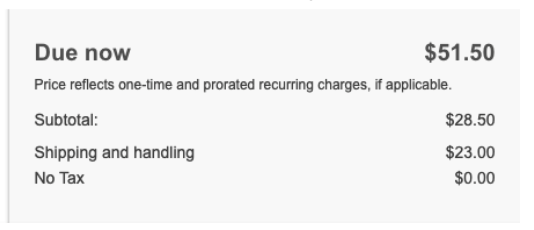
- Quote Versions and PDFs — New Quote Versions store Items sub-total and shipping separately. The Quote Version summary uses the same layout as the live Quote summary. Generated PDFs receive the same values for use in templates (for example, Items Subtotal and Shipping Fees Total).
📝 Note: Quote Versions created before this release do not include separate shipping fields; the summary falls back to the previous sub-total display. PDFs show shipping only after the marketplace enables shipping and updates its quote PDF template to include the new amounts.
Quote summary
Quote Version summary
Feature enablement
This feature is enabled by default.
Setting enablement
No setting enablement is required.
Documentation
Refer to the following:
Was this page helpful?
Tell us more…
Help us improve our content. Responses are anonymous.
Thanks
We appreciate your feedback!